An Attendance & Time Tracking Bot Built for Discord Teams
For global remote teams that run on Discord
Clock in and clock out without ever leaving the app your team already lives in
Set up in 30 seconds
Try it free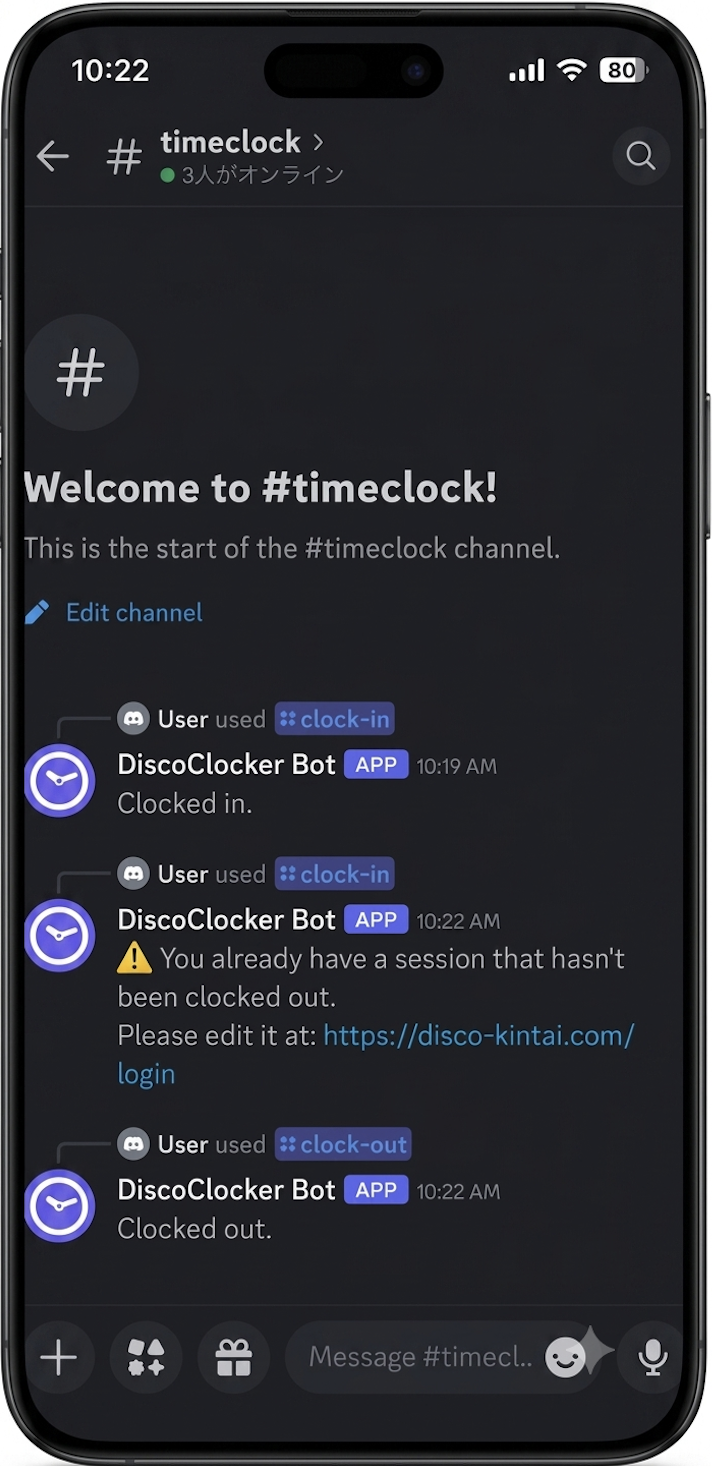
Everything you need for time tracking in Discord
Clock in and out with a slash command
Everything happens in Discord. No separate app, no browser tab.
Missed clock-out alerts
The bot automatically flags it when someone forgets to clock out.
Duplicate & invalid entry checks
Double clock-ins and out-of-order timestamps get caught automatically.
Team status at a glance
Check who's clocked in right now from the dashboard.
Admin-managed corrections
Admins can review and fix any
member's attendance, with every edit logged.
Pricing
Full access to every feature for your first 30 days.
- Unlimited use of all features
- No limit on member count
- Set up in 30 seconds
- No credit card required
Capped at $30/month once your team reaches 15 members.
- Unlimited use of all features
- Your trial data carries over
- Cancel anytime from the dashboard
- Past data stays viewable after cancellation
Time tracking problems specific to teams that live in Discord
Generic HR tools assume an office. Spreadsheets stop working once a team grows past a few people.
Hours scattered across DMs and spreadsheets
Chasing down everyone's hours at the end of the month eats up time nobody has to spare.
Missed clock-outs go unnoticed
Nobody catches a forgotten clock-out until someone's trying to reconcile the month, and by then the real time is hard to reconstruct.
Enterprise attendance software is overkill
Payroll modules and policy configuration built for hundreds of employees don't fit a five-person team, and cost more to run.
Global teams lose the "same month" everyone agrees on
When teammates clock in from different time zones, a spreadsheet has no single rule for where one day ends and the next begins — so monthly totals stop matching anyone's expectations.
DiscoClocker keeps time tracking inside the app your team already uses
Every manual step gets automated, so your team's time goes back to the work that matters.
Clock in without leaving Discord
Send "/clock-in" and you're done. No app to open, no separate login — the fastest way to clock in.
Missed and invalid entries get flagged automatically
If someone forgets to clock out, or a timestamp looks off, the bot catches it instantly — not your admin, weeks later.
Hours are totaled automatically
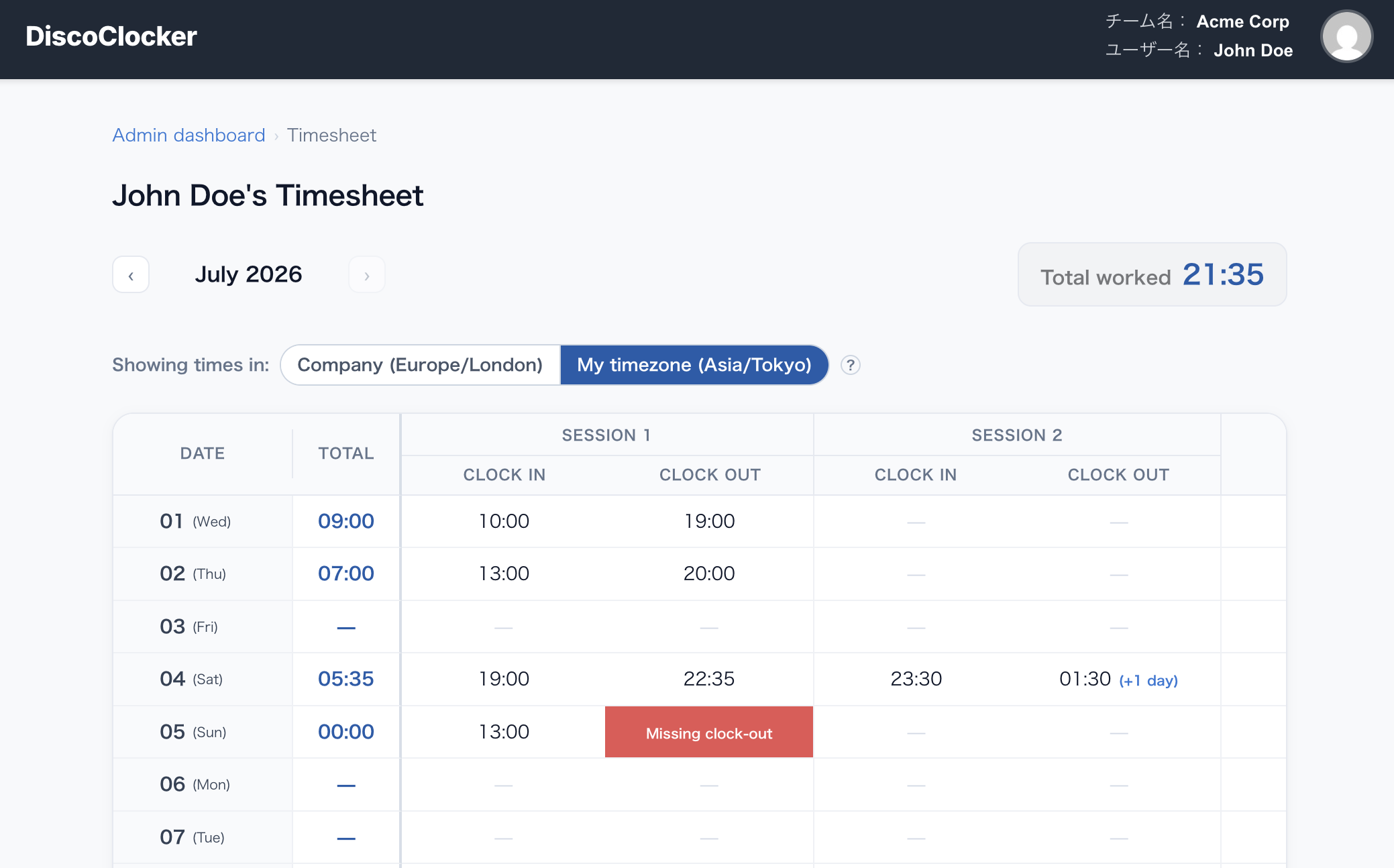
Every clock-in and clock-out is processed on the backend and available in real time on your dashboard.
One company time zone, converted for each teammate
An admin sets a single working time zone for monthly totals, while each person can still view their own timesheet in their local time — same source of truth, no comparing across zones by hand.
How to set up DiscoClocker
Setup takes just a few minutes. Start using it right away.
① Add the bot to your Discord server
Just follow a link to add it. No special configuration required.
② Add members from the dashboard
Add your team members and you're ready to go.
③ Clock in and out with slash commands
/clock-in /clock-out
④ Hours are totaled automatically — check your dashboard
Every entry is processed automatically and available in the dashboard.
Want the full walkthrough with screenshots? See how DiscoClocker works, step by step →
How DiscoClocker compares
Most alternatives fall into one of two camps: basic Discord clock-in bots, or full HR platforms built for much larger companies.
| DiscoClocker | Basic Discord clock-in bots | Enterprise HR / attendance platforms | |
|---|---|---|---|
| Built for | ✓ Small & remote teams | – Individual Discord communities | – Mid-to-large companies |
| Pricing | ✓ Simple per-user price, with a free trial | – Often free, features vary widely | ✗ Flat monthly fee plus per-seat costs |
| Editing & audit trail | ✓ Dashboard editing with a full history log | ✗ Varies by bot, often limited or none | ✓ Full HR workflow support |
| Setup | ✓ Add the bot and log in, ready in minutes | ✓ Usually just adding the bot | ✗ Payroll and HR policy configuration |
| Where it lives | ✓ Fully inside Discord | ✓ Fully inside Discord | ✗ Separate web app or dedicated device |
Frequently asked questions about DiscoClocker
Is there a Discord bot for time tracking?
Yes. DiscoClocker adds clock-in and clock-out slash commands directly to your Discord server.
Can it catch missed clock-outs?
The bot automatically detects missed clock-outs and duplicate entries, and notifies the user.
Is DiscoClocker good for small or remote teams?
Yes. It's optimized for small teams, and there's a free trial period available.
Does it work for part-time teams, not just full-time staff?
Yes. DiscoClocker doesn't distinguish between full-time and part-time members — anyone with access to your Discord server clocks in and out the same way.
Do I need anything besides Discord to use it?
Clocking in and out happens entirely in Discord, and you can review attendance anytime on the web dashboard.
Is attendance data aggregated automatically?
Yes. Every clock-in and clock-out is automatically compiled, and daily/monthly totals are available in the dashboard.
Does DiscoClocker handle time zones?
Yes. During setup, an admin sets one working timezone for the whole company, and monthly totals are calculated against it — so hours add up the same way for everyone, no matter where each person is logging in from.
We have team members spread across different time zones — does that work?
Yes. Anyone viewing a timesheet can switch the display between the company's timezone and their own local timezone, while the company's timezone stays the single source of truth for monthly totals.
Can we change the company's timezone after it's been set up?
Yes. An admin can update it anytime from the Company settings page in the dashboard.
Is there a free trial? Are there any limits?
Yes. DiscoClocker includes a 30-day free trial. After the trial ends, you choose whether to move to a paid plan yourself. You'll never be charged automatically.
Make time tracking simple, right inside Discord
Add the bot and start using it right away.
No complicated setup required.